14.11.7 Pull Request List
In Review Required or E-Signature modes, administrators can view all MRs/PRs on the Management Console → Version Control → Pull Requests page.
IDMP only provides a PR list view. PR review, commenting, approval, and merging must be done on GitLab or GitHub. Click the context menu on a PR row → View on GitLab (or View on GitHub) to jump to the corresponding Git platform.
Opening the PR List
Click Management Console → Version Control → Pull Requests in the left menu.
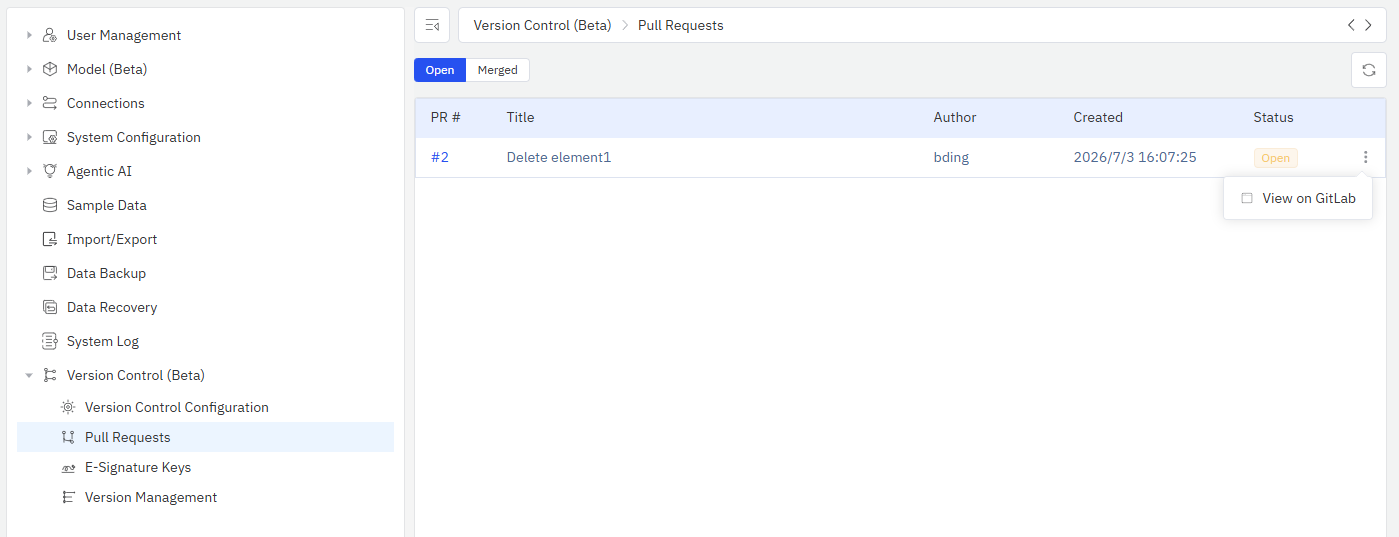
PR List
The list displays all MRs/PRs, filterable by status:
- Opened: MRs/PRs awaiting review
- Merged: MRs/PRs already merged into the main branch
List Columns
| Column | Description |
|---|---|
| PR # | MR/PR number |
| Title | MR/PR title (the reason for change entered during Check-In) |
| Author | Submitter name |
| Created | MR/PR creation time |
| Status | Opened / Merged |
Viewing PR Details
Click the context menu on a row → View on GitLab (or View on GitHub) to jump to the MR/PR page on the Git server for detailed diff and comments.
Review Workflow
- User modifies data in IDMP and performs Check-In
- System automatically creates an MR/PR on the Git server
- Reviewer views diff and writes comments on GitLab/GitHub
- Reviewer approves and merges the MR/PR
- IDMP receives the merge notification via Webhook:
- Auto-Push mode: Automatically pulls the latest version and updates the running system
- Manual mode: Pushes an SSE notification to the submitter, informing them that the MR has been merged
- All users see the updated data
Post-Merge Auto-Sync
The following auto-sync workflow only applies in Auto-Push mode. In Manual mode, the administrator must go to the Version Management page to manually publish a new version after merge.
After an MR/PR is merged, IDMP receives the notification via Webhook and automatically performs the following:
- Pulls the latest content from the main branch
- Rebuilds the database cache
- Refreshes the search index
- Updates TDengine virtual tables (if any)
- Pushes an SSE notification to the submitter ("MR merged")
If an error occurs during auto-publish, the system does not record the version in the version list, and the local repository is reset to its pre-publish state. The administrator will still see a pending PR count > 0 on the Version Management page and can click the Publish button to manually retry. See Version Publishing Management for details.
Personal branches are not automatically cleaned up after merge. Users can continue making other changes in their workspace, and subsequent Check-Ins will create new MRs/PRs on the same personal branch. To return to the public view, manually delete the personal workspace (see Personal Workspace).
Version Management Integration
On the Version Management page, the top section shows the "Pull requests approved since latest version" count. Administrators can use this to decide whether to publish a new version.
See Version Publishing Management for details.
