13.6 Knowledge Graph
Knowledge Graph is a technology that organizes document content and knowledge into a network structure: the system extracts entities and the relationships between them from documents, forming a knowledge network that can be queried and expanded along those relationships. It answers questions such as "what knowledge do the documents contain, how is that knowledge connected, what can be derived from what, and what are the logical relationships between knowledge points." All entities and relationships in the knowledge graph come from document content and are extracted automatically by the system — no manual modeling is required.
13.6.1 Positioning
IDMP has three concepts related to "graphs": the Industrial Ontology, graph / network analysis, and the knowledge graph. All three describe objects with points and edges, and their names and shapes are similar, so they are easy to confuse — yet they answer different business questions, define nodes and edges differently, and draw on different sources of information. The knowledge graph, the Industrial Ontology, and graph / network analysis are inherently related and similar, but they are technical concepts at different layers. The table below compares the three.
| Item | Knowledge Graph | Industrial Ontology | Graph / Network Analysis |
|---|---|---|---|
| Business question | What knowledge do the documents contain, how is it connected, how does it propagate | What objects exist in the physical world and how are they related | What patterns and characteristics does a network structure have |
| Nodes | Entities, i.e. knowledge points: concepts, principles, methods, rules, procedures, facts, scenarios, key points, and so on | Business objects: elements, attributes, templates, panels, rules, real-time analyses, events, and so on | Any object |
| Edges | Relationships between entities: basis, belongs to, composition, prerequisite, solves, causes, constraint, sequence, derives, applies to, affects | Physical connections between objects: upstream / downstream, measurement, interlock, and so on | Any connection |
| Source of information | Documents — derived entirely from parsing and extraction of uploaded documents | The physical world — configured and maintained by users | Defined by users |
| Business purpose | Querying, using, and validating knowledge, so that users and AI reason and analyze according to the same verified knowledge logic | Digital modeling of the physical world | Structure discovery, community analysis, quantitative evaluation of key nodes and edges |
The Industrial Ontology and the knowledge graph are two parallel semantic models. Both consist of a "semantic model + facts + reasoning"; the difference lies in what they describe. The Industrial Ontology describes the real physical world, and its nodes and edges come from user modeling. The knowledge graph describes knowledge, and its nodes and edges come from document content. In practice, the Industrial Ontology tells users and AI "what this device is, what attributes it has, and what its current data looks like", while the knowledge graph tells them "what the manual specifies, why it specifies it, and what the theoretical basis is".
Graph analysis and graph databases are not the same layer of technology. Graph / network analysis is a general-purpose analysis algorithm used by both the Industrial Ontology and the knowledge graph — the community-based coloring of entities in the graph view is the output of community detection (a graph analysis technique). A graph database is a carrier for storing and querying network data: it stores network structures more conveniently and executes graph mining algorithms more efficiently. Neither of them is the business semantic model itself.
13.6.2 Technical Implementation
The business value of a knowledge graph depends on how its entities and relationships are defined and extracted. IDMP does not let the LLM improvise: it first defines a business schema, injects that schema into the knowledge extraction process as extraction rules, and then merges the results into a graph structure through a predefined workflow. The schema has two parts: entity types and relationship types.
The business definition of an entity. The knowledge graph entity defined by IDMP is IDMP's business definition of a knowledge point: an entity is the smallest independently identifiable knowledge unit in the knowledge graph, that is, a relatively self-contained knowledge point. It can be a physical object, an abstract concept, or a standardized phenomenon, event, or method — as long as the object needs to be independently associated and reused, it can be defined as an entity. Every entity carries descriptive attributes such as name, alias, definition, type, and source.
| Entity type | Definition | Example (IDMP user manual) |
|---|---|---|
| Concept | A term, object, or abstract idea with a clear definition | Element, attribute, template, panel, real-time analysis, event |
| Principle | Mechanism knowledge and underlying logic | Level and volume utilization are conversions of the same physical quantity |
| Method | An executable approach or solution | Root-cause analysis, panel interpretation, stream computation |
| Rule | A condition, prerequisite, or judgment rule | AI features require a valid AI connection |
| Procedure | A multi-step execution plan | Click the AI icon → select a function → view the result |
| Fact | Objective values, boundaries, or default values | Range, limit, sampling frequency |
| Scenario | A description of a business scenario | Quality analysis, anomaly screening, SPC monitoring |
| Keypoint | A conclusion or key argument | General analysis creates no resources; AI Function sessions are independent |
| Document | The source of an entity | IDMP user manual 8.11 |
The business definition of a relationship. A relationship describes the intrinsic connection between knowledge points. IDMP defines eleven relationship types, grouped by purpose:
- Describing an entity's meaning and scope: Basis (why it holds), Belongs To (which class it belongs to), Composition (what parts it consists of), Applies To (which objects or scenarios it applies to), Constraint (what boundaries and limits it has).
- Describing operations and causality: Prerequisite (what must be satisfied first), Sequence (the order of multiple steps), Solves (what problem it solves), Causes (what result it leads to).
- Supporting derivation and propagation: Derives (what can be derived from it), Affects (what it affects).
Taking knowledge points contained in the IDMP user manual as an example: SPC monitoring contains eight control-chart rules (Nelson rules) through Composition, depends on the attribute limit configuration through Prerequisite — the four limits CL, Sigma, USL, and LSL — applies to manufacturing and quality-control scenarios through Applies To, and produces the corresponding device events through Causes.
Entity and relationship extraction and updates. IDMP ships a complete built-in workflow for extracting and refining entities and relationships. Users only upload documents; splitting, extraction, deduplication, and merging all happen automatically in the background, with no manual intervention. When a document is added or modified, its knowledge is extracted and merged into the existing network; when a document is deleted, its entities and relationships are removed from the network as well.
13.6.3 Data Sources
IDMP pre-loads the TDengine IDMP and TDengine TSDB user manuals as the initial documents of the knowledge graph. This content is the initial source of information for the knowledge graph module. It is available for querying as soon as the system is installed, and requires no configuration from users.
On top of that, any document a user uploads to the system is added to the current knowledge network. There are two sources:
- Global documents: documents uploaded in Libraries → Agentic AI → Documents that do not belong to a specific element.
- Element documents: documents uploaded in the Related Documents section of an element's General tab, such as equipment manuals, calibration reports, and alarm code tables.
The document types currently supported include PDF, Word, PowerPoint, Excel, Markdown and plain text, HTML, RTF, EPUB, and other common formats.
After a document is uploaded, the system processes it asynchronously in the background: it is first converted to Markdown and indexed for retrieval, and then entities and relationships are extracted from its content and merged into the knowledge graph. The Status column in the document list shows processing progress, with the values Uploaded, Processing, Indexed, or Failed; only when the status is Indexed can the document's entities be queried in the knowledge graph.
When a document is deleted, the system removes that document's entities and relationships from the knowledge graph asynchronously. If the removal fails, the document's entities may remain in the graph temporarily until the next graph update.
The knowledge graph module builds graphs per language: Chinese documents go into the Chinese graph, and documents in other languages go into the English graph. The Knowledge Graph page queries the graph that matches the current UI language, so switching the UI language switches to the other graph.
13.6.4 Access Points
In the current system, there are three ways to access the knowledge graph:
| Access point | Description |
|---|---|
| Knowledge Graph page | Libraries → Agentic AI → Knowledge Graph. Browse the entire graph, or query a subgraph by document category, document name, entity, and relationship depth. |
| Document entry points | Knowledge Graph in the ⋮ menu of the document list or of an element's Related Documents, to view the knowledge network of a specific document directly. |
| AI Chat and AI Functions | Without opening the Knowledge Graph page, AI can call graph queries when answering questions related to document knowledge. |
The Knowledge Graph page is the main entry point for working with the knowledge graph. The filter bar is at the top of the page, the graph canvas is at the bottom left, and the information panel is on the right. All filter conditions are optional; when none of them is set, the entire knowledge network is displayed by default.
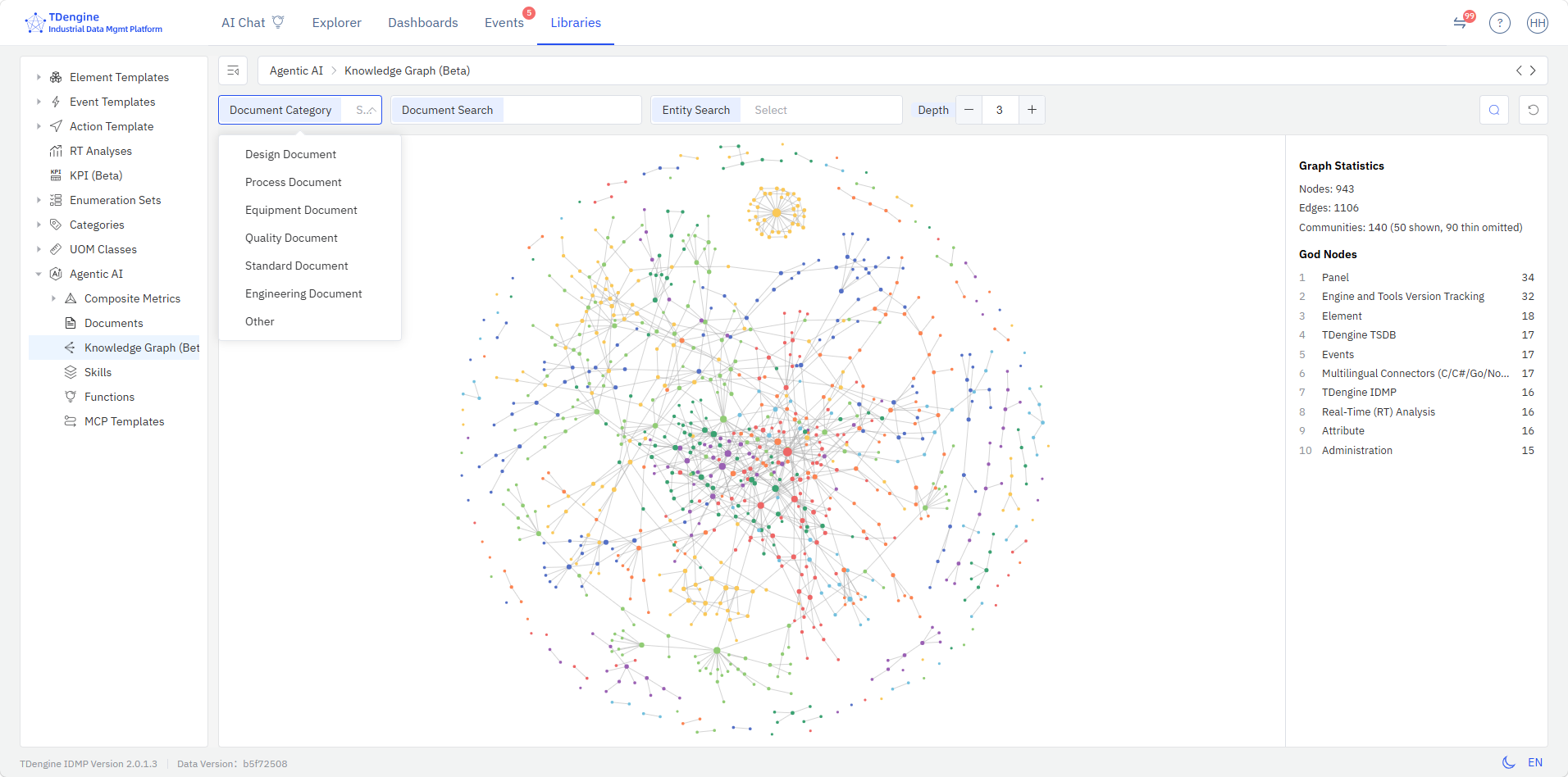
| Filter | Description |
|---|---|
| Document Category | Filters by document category. Values come from the Document Category enumeration set in Libraries, for example Design, Process, Equipment, Quality, Standard, Engineering Document, and Other. |
| Document Search | Filters by document name. Multiple documents can be selected, and candidates include only documents uploaded by users. |
| Entity Search | Filters by entity name. Select one entity from the matching candidates, and the graph expands around that entity. |
| Depth | The number of relationship layers expanded outward from the matched entities. The value ranges from 0 to 10 and defaults to 3. The larger the value, the more entities and relationships are returned. |
After setting the conditions, click Search to re-query the graph; click Reset to clear all conditions and restore the entire graph.
The graph canvas displays knowledge entities and their relationships in a network layout: each node is a knowledge entity, and each line indicates that a relationship exists between two entities. The larger a node, the more relationships the entity has. Node colors distinguish the community an entity belongs to — that is, a group of closely related entities. The canvas supports zooming and dragging, and node positions can be adjusted manually.
After you select a node, the information panel on the right shows the entity's information:
| Field | Description |
|---|---|
| Name | Entity name. |
| Type | The type assigned to the entity during extraction, such as Concept, Method, or Rule. |
| Related Document | The name of the document the entity comes from. |
| Relations | Every relationship between this entity and its neighboring entities, listing the entities at both ends of each relationship and the relationship type. |
When no entity is selected, the panel on the right shows graph statistics: Nodes, Edges, Communities, and God Nodes (the most connected entities, sorted by number of relationships). The Communities entry also reports how many communities are shown and how many thin communities are omitted — communities with few nodes are not drawn on the canvas, to keep the graph readable. Click an empty area of the canvas to clear the selection, and the panel returns to the graph statistics.
When the system contains many documents with a large number of knowledge points, the knowledge graph becomes very dense. Narrow the scope to a single document or entity with Document Search or Entity Search first, and then adjust Depth. This is easier than browsing the entire graph to locate the knowledge you need.
13.6.5 Application Scenarios
The knowledge graph turns documents from "text for people to read" into "knowledge assets that the system can reason over".
Its business value concentrates on three things: knowledge extraction — distilling independently reusable knowledge points from long documents; knowledge linking — connecting knowledge points scattered across different documents and chapters according to business semantics; and knowledge reuse — letting knowledge that has already been accumulated be reused across documents and across equipment.
Retrieval techniques that work only on document fragments (such as RAG) can only answer "which passage of text is most similar to the question". They produce no entities and no relationships between entities, so single-pass retrieval cannot connect knowledge points scattered across chapters into one chain; and even if multi-round retrieval pieces a lead together on the fly, it is not retained and cannot be audited, so the next question starts from scratch.
Typical application scenarios include:
- Knowledge extraction: Distill independently reusable knowledge points (alarm meanings, handling steps, limits, required spare parts) from long manuals, procedures, and standards, so the key points can be grasped without reading the whole document.
- Knowledge reuse across similar equipment: Once a piece of maintenance experience is linked to an equipment type entity, other equipment of the same type can reuse the same body of knowledge; such jumps require an explicit entity-and-relationship structure to be established reliably, audited, and rolled back.
- Assembling knowledge for fault handling: Starting from an alarm or phenomenon entity, expand hop by hop along relationships such as Causes, Sequence, Constraint, and Composition to assemble causes, steps, limits, and spare parts scattered across different chapters into a single chain.
- Cross-document verification of the basis: The basis and impact relationships among equipment manuals, process procedures, and inspection standards are recorded explicitly, so a conclusion can be traced along those relationships back to its source, rather than merely being "mentioned somewhere in some document".
- Injecting knowledge into AI analysis: AI Chat and AI Functions (root-cause analysis, panel interpretation, general analysis) query the knowledge graph during analysis and use the relevant entities and relationships as context; answers can cite the knowledge points and source documents they used, for verification.
Usage Example: Reusing Maintenance Knowledge Across Similar Equipment
Scenario
A cement plant has six roller presses of the same model, created as elements from the same element template in IDMP. No. 5 roller press once shut down because of hydraulic system pressure fluctuation, and the handling process and conclusions were compiled into a Hydraulic System Fault Handling Record, uploaded as a related document of No. 5 roller press.
How the knowledge is extracted
The knowledge graph module extracts entities such as "hydraulic system pressure fluctuation", "seal wear", "handling steps", "pressure limit", and "required spare parts" from this uploaded record, together with the Causes, Sequence, Constraint, and Composition relationships between them. No. 5 roller press and the other five presses belong to the same roller press type, so these knowledge entities are linked to the "roller press" type entity through the Applies To relationship and become knowledge shared by all equipment of that type, rather than just another document of No. 5.
How other equipment reuses it
Some time later, No. 3 roller press raised the same pressure fluctuation alarm, and a maintenance technician asked AI Chat how to handle it. AI followed the chain "No. 3 roller press → Belongs To → roller press → hydraulic system pressure fluctuation → Causes → seal wear → Sequence → handling steps → Constraint → pressure limit" to retrieve the knowledge deposited by No. 5, and provided the handling sequence and judgment limits specified by that model, noting that the basis came from No. 5's handling history. The root-cause analysis agent can also reference this knowledge chain and treat "seal wear" as a candidate cause, instead of only seeing from the data that the pressure is fluctuating — which makes the root-cause analysis more targeted.
If the system performed only document-fragment and keyword retrieval, a question about No. 3 roller press would neither match No. 5's handling record nor connect "pressure fluctuation" with "seal wear" and "pressure limit" into a handling chain — there is no literal connection between the documents of the two pieces of equipment.
Results
A record of one historical handling experience on one piece of equipment thus becomes a knowledge asset shared by six pieces of equipment of the same type, instead of staying in one equipment's documents or in one engineer's memory.
